

What AI Search Actually Costs, and Where the Money Goes
Standing up AI search and chat has never been easier. You connect your data, pick a model, embed your content, and ship a widget. The part nobody warns you about is what happens next. The costs arrive quietly, and most teams don't find out what their AI search really costs until the monthly invoice lands. By then it's hard to say which part of the system did the damage.
That unpredictability is the real problem, not the price. AI search is usage-based, so the bill scales with your traffic, the size of your catalog, and choices you made months ago and forgot about. None of it is mysterious once you break it apart, and every piece is controllable. Here is where the money actually goes.
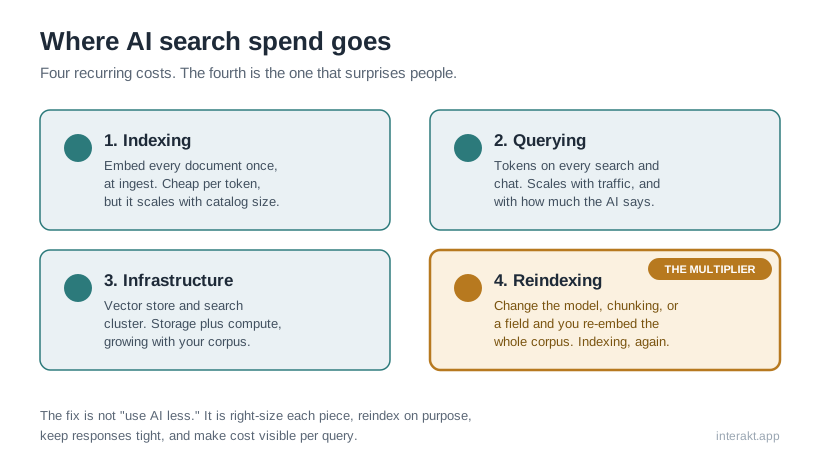
The four places your money goes
AI search cost is rarely one big number. It's four smaller, recurring ones.
The first is indexing. Semantic search turns every document into a vector, called an embedding, and you pay per token to generate those embeddings when you first index your data. The reassuring part is that embeddings are a separate, far cheaper class of model than the ones that write answers. OpenAI publishes dedicated embedding models priced well below its text-generation models on its API pricing page. Indexing a catalog is usually a modest, mostly one-time cost.
The second is querying. Every search or chat interaction spends tokens: a small embedding for the user's query, plus generation tokens if you produce an answer or summary. This scales directly with traffic, and it's sensitive to how much your AI says, because providers price generated output tokens higher than the input tokens you send (you can see the split on OpenAI's pricing page). More on that below.
The third is infrastructure. Your vector store or search cluster costs storage and compute that scale with the size of your corpus and the redundancy you run. It's the most predictable of the four, and it grows as your content does.
The fourth is reindexing, and it's the one that blindsides people, so it gets its own section.
The reindexing trap
This is the cost that's easy to trigger by accident and painful to ignore. An embedding is produced by one specific model. In Elastic's own vector search tutorial, embeddings are stored in a dense_vector field whose dimensions are set by the model that generated them, and they are written by running that model over your content as the index is built. Change the model, change how you chunk content, or restructure what you index, and the existing vectors no longer fit. You have to regenerate them. As the Elastic tutorial puts it, once embeddings are involved, "the index can be rebuilt, so that it stores an embedding for each document."
On a large corpus, a rebuild is another full pass over everything, so the indexing cost you thought was one-time gets paid again. Teams set this off casually while iterating on an experience.
A few habits keep it under control. Re-index incrementally, regenerating only the documents that actually changed, whenever your platform allows it. Keep content changes and schema changes separate in your head: adding products is cheap and incremental, while swapping an embedding model is a full re-embed that deserves a deliberate decision. And before you change the embedding model across a large corpus, test it on a representative sample and confirm the quality gain is real before you pay to regenerate everything.
The mental model that helps: treat a full re-index of a large corpus as roughly equal to your original indexing cost. If that number makes you wince, you'll reindex on purpose instead of by reflex.
Right-size the model to the job
A lot of waste comes from using one large, expensive model for everything. Two corrections go a long way.
First, don't use a flagship chat model to create embeddings. Providers ship purpose-built embedding models for exactly this, priced far below their generation models, as OpenAI's separate embedding line on its pricing page shows. Using the right tool here is a pure, invisible saving.
Second, right-size the generation model to each step of the work. Detecting intent or routing a query doesn't need your most capable model, even if synthesizing the final answer does. Assigning a smaller, cheaper model to the simple steps and reserving the flagship for the hard one is one of the clearest levers you have on the bill. A platform that lets you assign different providers and models to different steps turns that from a wish into a setting.
Do you even need semantic search here?
Keyword search is nearly free on the compute side, with no embeddings at index time and none at query time. Semantic search pays embeddings on both ends. Hybrid search, which fuses keyword and vector results, tends to give the best relevance, so you're paying for the semantic half because it earns its place.
And it usually does. Microsoft's Azure AI Search documentation states that "benchmark testing on real-world and benchmark datasets indicates that hybrid retrieval with semantic ranker offers significant benefits in search relevance," with the two result sets merged using Reciprocal Rank Fusion. The point isn't that semantic search is too expensive. It's that you should choose the mode per experience rather than defaulting everything to the priciest option. For some content, well-tuned keyword search with good synonyms is genuinely enough.
The chattiness tax, and the local lever
Two last levers. The first is what you might call the chattiness tax. Output tokens are the expensive ones, since providers price generated output above the input you send (again, visible on OpenAI's pricing page). Long answers and oversized retrieved context inflate the bill on every single query, so capping response length and retrieving fewer, better passages improves cost and user experience at once.
The second is the local lever. Embeddings and all of your development and test traffic can run on local models. Ollama, for instance, runs open models on your own hardware, so there's no per-token API charge for that work. That lets you save paid API spend for the production generation where quality genuinely matters.
You can't control what you can't see
Every fix above depends on one thing: visibility. The reason AI search cost feels frightening is that most teams meet it as a single aggregate number weeks after the fact, with no way to tie it to a query, an experience, or a stray re-index. You can't manage a number like that. You can only flinch at it.
Teams that keep costs predictable do one thing differently. They see cost per query as it happens, so they know which experiences are chatty, which queries call the expensive model, and whether last Tuesday's reindex was necessary. It's why Interakt records tokens and cost on the execution trace of every query, right next to the guardrail, the tools it called, and the data it retrieved. Cost stops being a monthly surprise and becomes one more thing you can tune.
The takeaway
AI search cost isn't a monster. It's four ordinary, recurring costs (indexing, reindexing, query-time tokens, and infrastructure) that compound quietly when nobody is attributing them. Right-size the model to each step, choose your search mode per experience, keep responses tight, reindex on purpose, and above all make the spend visible. Do that and the bill gets boring, which is exactly what you want.